To change your browser language, read this article.

  • Customer Log-In
  • Contact Us
    • Account & Device Activation

      • Activate Devices

        • Installation

          • Dash Cams

            • My Account

              • Map

                • Reports

                  • Maintenance

                    • Alerts

                      • Mobile App

                        • Features

                          • ELD

                            • Troubleshooting

                              • Integrations

                              • Home
                              • Installation
                              • Wired Vehicle Tracker

                              Wired Vehicle Tracker

                              Contact Us

                              If you still have questions or prefer to get help directly from an agent, please submit a request.
                              We’ll get back to you as soon as possible.

                              Please fill out the contact form below and we will reply as soon as possible.

                              • Account & Device Activation
                              • Activate Devices
                              • Installation
                                OBD Plug-in Wired Vehicle Tracker JBUS Device AT3 linxCam Dash Cam ATLT Daily Legacy Solar Tracker Solar Tracker Mini Tracker
                              • Dash Cams
                                Camera Settings linxCam FAQ Dash Cam FAQ
                              • My Account
                                API Billing Canceling Service Contact Support Credentials Devices & Troubleshooting
                              • Map
                                Geofences Map Alerts Route Replay Settings Tracking
                              • Reports
                                Driver Reports IFTA Vehicle & Equipment Reports
                              • Maintenance
                                Maintenance History Maintenance Reminders
                              • Alerts
                                Alert Notifications Alert Settings Safety Alerts Summary Emails Troubleshooting Alerts Vehicle Alerts
                              • Mobile App
                                Account Settings Coaching Sessions Customers Item Tracking linxCam Live Streaming Map Setup Tracker Information
                              • Features
                                Coaching Sessions Customers Dispatch Driver Coaching Fuel Cards Fuel Consumption Geofences Groups Item Tracking Linxup AI Location History Maintenance Notifications Reports Safety Score Share ETA Timesheets Users & Drivers
                              • ELD
                                ELD FAQ ELD Onboarding Helpful Links
                              • Troubleshooting
                                OBD Plug-in Troubleshooting Wired Vehicle Tracker Troubleshooting JBUS Troubleshooting AT3 Troubleshooting linxCam Troubleshooting Dash Cam Troubleshooting ATLT Daily Troubleshooting Legacy Solar Tracker Troubleshooting Solar Tracker Troubleshooting Mini Tracker Troubleshooting
                              • Integrations
                                Procore ServiceTitan Whip Around Fleetio
                              + More

                              Table of Contents

                              Video Walkthrough Installing Your Wired Tracking Device

                              Below are the installation instructions for your device.

                              To view the device on your portal, please ensure to activate your device.


                              Wired Vehicle Tracker


                              Video Walkthrough

                              How to Install Wired Vehicle Tracker


                              Installing Your Wired Tracking Device

                              • Wiring the device into a vehicle is easy, and requires installation inside the passenger compartment of the vehicle.
                                • The Linxup wired device has a series of wires — you will only need to attach three of these wires to your vehicle (the additional wires are for future features or functions).


                              1. The three wires you need are: the red wire (power), the black wire (ground), and the white wire (ignition sense).
                                • Locate a connection point in the vehicle for constant power, such as the fuse box. Remove the insulation on the selected wire.
                                • Connect the red wire on the Linxup device to the vehicle's constant power wire. This connection allows the device to receive power when ignition is off and on.
                                • Connect the Linxup black wire to your vehicle’s chassis. This connection serves as a ground for the device.
                                • Locate the vehicle’s ignition wire (reference the vehicle’s wiring diagram in order to locate).
                                • Verify the ignition wire by measuring the operating voltage while the key is turned to the ON or START position (the voltage should read 0 VDC when the key is in the off position, and typically between 11V and 14V when in the ON position).
                                • Connect the white wire on the Linxup device to the vehicle’s ignition wire. This connection allows the device to report ignition OFF and ON events.
                                • An optional plastic zip tie is included to secure the device under the vehicle dash with the label that reads “Label Side Down” facing down.


                              1. Confirm the power connection.
                                • Following installation, allow 5-10 minutes for the Linxup device to power up and obtain a cellular and GPS fix. Your vehicle must be outside and not in a covered area so that it will receive GPS signal. When working properly, the blue light will blink once every 3 seconds and you will see a blinking green light.
                                • You should see your car’s location on the map (may take up to two hours).
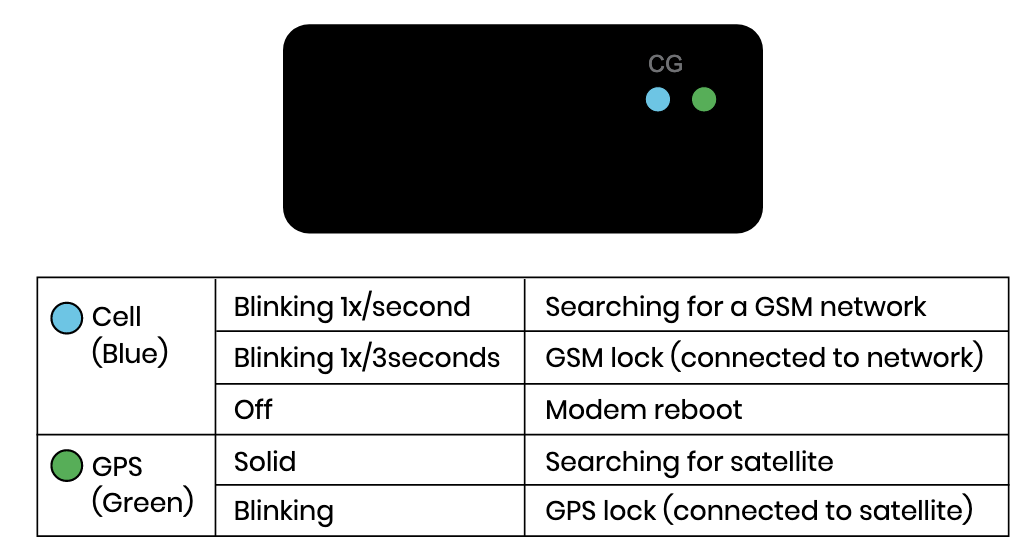
                               

                              Wired vehicle tracker blue and green lights descriptions


                              NOTE: You have the option to connect the yellow wire to monitor a secondary input following the instructions in step 3. 

                              Unused wires should be taped out of the way and prevented from making contact with anything metal.

                              Visit https://www.linxup.com/wiredinstall/ to watch a video on the installation process.


                              1. For most PTO applications, follow the instructions below:
                                • Locate and connect the unpowered side of the control switch for the equipment being monitored.
                                • Connect the yellow wire to the correct terminal on your automotive relay.
                                • Connect the two remaining terminals on your relay to ground.


                              PTO Diagram


                              NOTE: Should your vehicle require a jump start, you will have to replace the fuse in the wiring harness with a 3 amp fuse.


                              That's it! You're ready to start tracking.

                              Now it's time to start customizing your account. Visit our features section to learn how to set up users, geofences, alerts, and more.


                              View Wired Vehicle Tracker Troubleshooting


                              Was this article helpful?

                              Yes
                              No
                              Give feedback about this article

                              Related Articles

                              • OBD Plug-in
                              • linxCam
                              • Installation
                              • Mini Tracker
                              Linxup GPS Trackers
                              Activate Devices Customer Log-In Support
                              Call us today 1-877-732-4980
                              Copyright ©2024 Linxup

                              Knowledge Base Software powered by Helpjuice

                              Expand